November SPECIAL OFFER! Sign-up to our newsletter to receive the latest offers and news.
Media Console for an 85 Inch TV: Choosing a Unit Wide Enough
An 85 inch TV is roughly 188–193 cm wide, so a 200 cm media console can provide a modest border, while 220–240 cm gives more space either side. When choosing a media console for an 85 inch TV, check your model’s overall dimensions first. For tabletop placement, also verify the feet’s footprint, console depth and rated load capacity.
The distinction is between furniture that physically supports the television and furniture that looks generous beneath it. You do not need a large border simply because the screen is large, but you do need the right measurements.
Key Takeaways
A 200 cm console provides a compact border around most models.
Choose 220–240 cm for more visible space either side.
Measure the television’s casing, not its advertised diagonal.
Check the complete feet or pedestal footprint.
Width and solid hardwood construction do not prove load suitability.
Plan console height around your seated eye level.
How wide is enough?
Choose 200 cm for a close-fitting arrangement, or 220–240 cm for a broader base beneath an 85 inch television. These widths describe the visual relationship; physical suitability still depends on the television’s support footprint and the furniture’s specifications.
Screen versus casing
The 85 inch measurement runs diagonally across the screen. It equals 215.9 cm, but it is not the width you need when shopping for furniture.
A standard 16:9 screen of this size is approximately 188.2 cm wide and 105.8 cm high. The bezel, meaning the border around the display, adds to those measurements. Use the overall width of the television’s casing rather than calculating from the diagonal.
Look for separate dimensions with and without the television’s stand. Overall depth without the stand tells you little about how much space the feet need on a console.
Compare the margins
The table below uses an illustrative 190 cm-wide television, centred above each console. The margins are calculated from the outside edges of the television’s casing, not the illuminated picture.
Console width
Difference from TV width
Margin on each side
Visual result
180 cm
10 cm narrower
5 cm TV overhang
Screen extends beyond the furniture
200 cm
10 cm wider
5 cm
Close-fitting, modest border
220 cm
30 cm wider
15 cm
Clear border with some spare surface
240 cm
50 cm wider
25 cm
Generous horizontal base
A 200 cm console is therefore not automatically too small. Its border is simply less generous than the border provided by a wider unit. At the upper end of the typical television width range, that border becomes narrower still.
Recommendations of 220–280 cm describe a spacious visual treatment, not a universal minimum for supporting the television. Extra surface beside the screen also does not automatically create useful equipment space: speakers and accessories have their own dimensions.
We recommend marking your preferred console width on the wall with low-tack tape. Look at it from the sofa, with the television outline marked above it. A few centimetres on a product page can look quite different across a living-room wall.
Check physical support
For tabletop placement, the console needs to accommodate the television’s complete base and carry its weight in the intended position. A wide top alone proves neither. Treat the support checks separately from your choice of side margin.
Feet and pedestal
Measure the footprint: the full area occupied by the feet or central pedestal. For separate feet, this includes the distance between their outer edges and their full front-to-back depth.
Do not use only the distance between the attachment points beneath the television. Angled feet can extend beyond those points, and a central pedestal can project well forward of the screen.
For example, imagine a television with feet measuring 165 cm across and 38 cm from front to back. Centred on a 200 cm-wide, 45 cm-deep top, they would leave 17.5 cm at each side and 3.5 cm at the front and back. That establishes the geometric fit; it does not establish the permitted load or compliance with the television’s placement instructions.
Some televisions offer more than one foot position. Use the dimensions for the position you intend to install, rather than assuming the narrow setting is available on every model.
Depth and placement
Console depth is often the overlooked measurement. A shallow unit can look comfortably wider than the television while leaving part of its base unsupported.
Start by looking at tops around 40–50 cm deep, then select against your exact footprint. This is a useful shopping range, not a substitute for measuring. A deeper pedestal or a particular cable arrangement can require more space.
Check usable top depth rather than overall furniture depth if a raised back, lip or other feature reduces the flat surface. Also allow room behind the screen for connected plugs without forcing the television forward.
Rated load
Use the television’s weight including its fitted stand, then add any other items sharing the top. A wall-mount weight specification often excludes the feet or pedestal.
As an illustrative calculation, a 45 kg television and a 5 kg soundbar place 50 kg on the top. A stated 40 kg top limit would be insufficient, regardless of the console’s width or material.
Confirm whether the furniture rating applies to the top, an individual shelf or the whole unit, and whether it assumes an evenly spread load. Television feet concentrate weight in specific places. Solid hardwood is a material choice, not a load rating; the joints, supports and overall design matter too.
Compact side margins
A modest border suits a room where the television already occupies most of the available wall. Choose it deliberately rather than treating a wider console as the automatic upgrade. The trade-off is straightforward: you gain a less crowded wall, but have less spare surface beside the screen.
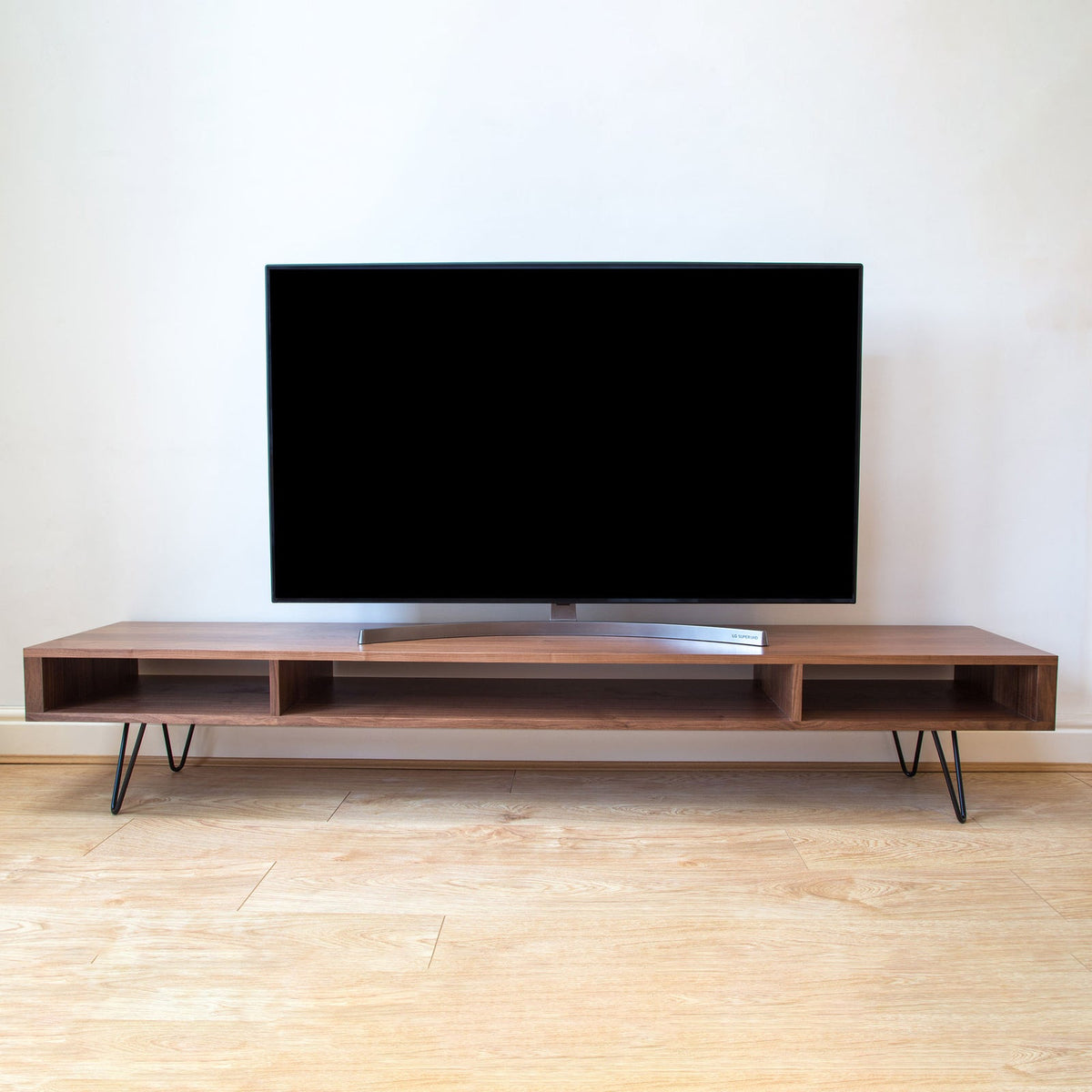
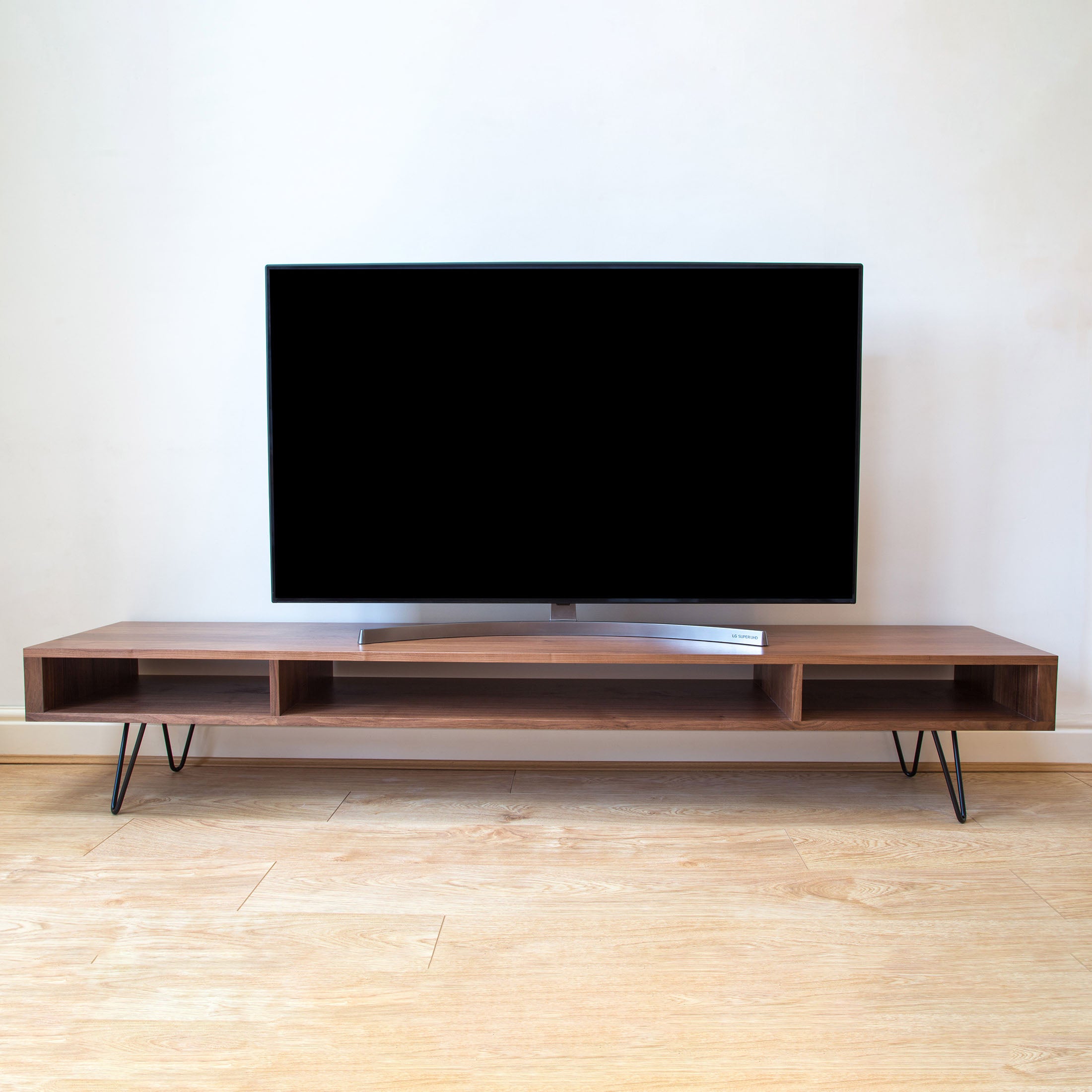
For this approach, our Marston Wide TV Stand on Mid Century Hairpin Legs offers 180 cm and 200 cm widths. Its low-slung, linear design combines solid hardwood with mid-century hairpin legs, creating a pared-back, Scandinavian look.
The 200 cm option is the relevant starting point if you want the furniture wider than a typical 85 inch television. The 180 cm option creates a different relationship, with the screen extending beyond the furniture’s edges. Neither option should be selected for tabletop use on width alone.
The design offers 20 cm or 30 cm leg heights, with oak, dark ash, walnut and iroko options. Leg height is not the same as overall furniture height, so use the complete dimensions when planning the screen position.
With a compact side margin, keep the top visually quiet. A soundbar beneath the screen often makes better use of the space than objects squeezed beside it. A small border is still a border, after all.
Allow the surrounding wall to do some of the work. If the console sits between alcoves or close to a doorway, a restrained width can look more settled than furniture stretched almost to the room’s limits.
Wall-mounted proportions
A wall-mounted 85 inch television does not require a wider console for support because its bracket carries the screen. Choose the console width for visual balance, storage and the space available on the wall.
Separate the jobs
Wall mounting removes the television’s feet from the furniture calculation. It does not remove the need to plan the relationship between the two pieces.
Physical support concerns the television’s base and weight. Visual balance concerns how the screen and furniture look together.
A console narrower than the screen can work beneath a wall-mounted television, particularly when the furniture has a separate storage role. The screen will appear more dominant, so choose that effect knowingly.
If you prefer the furniture to anchor the arrangement, use a top that extends visibly beyond the television. We favour this approach when the screen is the main feature on an otherwise uncluttered wall.
Read the wall
Measure the usable wall between fixed features, not simply the room’s full width. Door frames, curtains, radiators and alcove edges can make part of that width unavailable.
On an illustrative 300 cm usable wall, a centred 240 cm console leaves 30 cm at each end. A 200 cm console leaves 50 cm. Both arrangements fit, but the wider option uses more of the wall and leaves less room for adjacent furniture.
Centre the television and console together as your starting point. Offset arrangements need a clear reason, such as a separate listening area or storage zone, rather than an accidental mismatch between the screen and cabinet.
Finally, decide where cables will run before fixing the screen position. A visible cable dropping beside the console can undermine an otherwise carefully measured arrangement.
Height and equipment
Choose console height around the position of the screen, then make room for the soundbar and equipment. A large television can sit too high even on furniture that looks relatively low.
Seated eye level
Measure your eye height while sitting naturally in your usual viewing position. Use that as the starting point for the centre of the screen, rather than adopting a fixed mounting height for everyone.
An 85 inch screen is about 106 cm tall, so its centre is roughly 53 cm above its lower edge. In an illustrative setup, a console top 45 cm above the floor and a screen beginning 6 cm above it place the screen centre at approximately 104 cm.
Use the distance to the actual lower screen edge, not merely the height of the television’s feet. Then compare the result with your seated eye level. A relaxed sofa position and an upright armchair can produce different comfortable arrangements.
For a wall-mounted television, mark the screen centre before deciding the gap above the console. Otherwise, an attractive gap can quietly push the screen higher than you intended.
Soundbar space
A soundbar needs enough room in front of the television without covering the lower picture or blocking the remote-control receiver. Check its height against the clear space beneath your particular screen.
Depth matters here too. A soundbar cannot occupy the same surface area as a projecting pedestal simply because both items fit within the console’s overall width.
If your soundbar has upward-firing speakers, follow its placement instructions and keep those speakers clear. Sliding it into a close-fitting shelf changes how it works.
Airflow and cables
Measure equipment compartments internally. External cabinet dimensions do not tell you whether an amplifier, games console or set-top box will fit with its cables connected.
For example, a component 32 cm deep with an 8 cm allowance for plugs and cable bends already needs 40 cm of usable depth. Any ventilation clearance specified for that component is additional.
Keep ventilation openings clear, and follow each device’s stated spacing requirements rather than applying one gap to every item. Open shelving makes access easier, but equipment still needs clear air paths and space around its vents.
Customisable dimensions
Choose customisable furniture when standard dimensions leave you compromising on the border, screen height or equipment space. Start with the required measurements, then choose the wood and details around them.
Build the brief
A useful furniture brief separates appearance from function. Give the maker the television’s exact model and your intended arrangement, rather than asking only for something suitable for an 85 inch screen.
Work through these four steps:
Record the television dimensions. Include overall casing width, installed height, full base footprint and weight with the stand.
Set the furniture envelope. Record your preferred width, maximum room depth and target overall height.
Measure the equipment. Include internal shelf space, connected cables and the maker’s ventilation clearances.
Specify the loading. Identify what will sit on the top and shelves, including where the television’s feet will rest.
Keep preferred dimensions separate from fixed limits. For example, a desired generous border is flexible; a doorway beside the unit is not.
Do not assume that adding width resolves every issue. A longer top changes the span between supports, so the design needs to suit the proposed load as well as the room.
Choose the hardwood
At Urban Editions, we make furniture to order in a family-run UK joinery, using sustainably sourced solid hardwoods. You can browse our customisable solid hardwood TV stands with your measurements in hand and use wood samples to compare colours at home.
View samples beside the floor, nearby furniture and wall colour, both in daylight and under your evening lighting. Walnut and oak create different contrasts against a large dark screen, so choose for the whole arrangement rather than matching one isolated item.
For a minimalist interior, prioritise a clear outline and the right overall scale. Mid-century legs can leave more floor visible, while the cabinet above provides the horizontal line beneath the television. Judge the complete piece, including its total height, rather than the leg style alone.
Conclusion
Mark out a 200 cm console first, then extend the outline to 220 cm and 240 cm. Choose the smallest width that gives you the border and storage you want without crowding the wall. Before ordering for tabletop use, match the exact television footprint and installed weight to the console’s usable top and rated load. Those checks turn a promising visual fit into a properly specified arrangement.
Frequently Asked Questions
Is a 200 cm TV unit wide enough for an 85 inch TV?
Yes, a 200 cm TV unit can be wide enough, with a modest border around most models. For tabletop placement, that answer also depends on the feet fitting fully on the usable top and the furniture carrying the installed weight.
How much wider than the TV should the console be?
For a compact look, about 10 cm wider overall gives roughly 5 cm on each side. An extra 30–50 cm overall creates a more generous border. These are visual choices, not mandatory safety clearances.
Can an 85 inch TV sit on a stand narrower than the screen?
Yes, provided the television’s instructions permit the arrangement, its entire base is supported and the furniture has a suitable load rating. The screen can extend beyond the furniture without the feet doing so, although the result looks more top-heavy.
Does a wall-mounted television need a wider console?
No, wall mounting does not create a support requirement for a wider console. Choose the width around storage and appearance instead. A console wider than the screen creates a visible base; a narrower one makes the television more visually dominant.